
GPT-Live · Launched July 8, 2026
GPT-Live Explained: OpenAI's New Full-Duplex Voice AI (July 2026)
GPT-Live is OpenAI's newest voice model and the biggest architecture change to ChatGPT voice since launch. It replaces Advanced Voice Mode across iOS, Android, and ChatGPT.com.
Quick Answer
- GPT-Live launched July 8, 2026. It replaces Advanced Voice Mode.
- GPT-Live-1 (paid) · GPT-Live-1 mini (free)
- Available on iOS, Android, and ChatGPT.com
What Is GPT-Live?
What Is GPT-Live?
GPT-Live is OpenAI's 2026 voice model built for natural, uninterrupted conversation. Unlike earlier GPT voice modes, it listens and speaks at the same time, hands off hard questions without breaking the conversation, and fully replaces Advanced Voice Mode as the default ChatGPT voice experience.
Full-duplex audio
GPT-Live listens and speaks simultaneously instead of waiting for you to finish talking, so it can react, agree, or interrupt naturally — like a real conversation.
Delegation to GPT-5.5
When a question needs deeper reasoning, GPT-Live silently hands it off to GPT-5.5 in the background and keeps talking, so the conversation never stalls waiting for an answer.
Replaces Advanced Voice Mode
GPT-Live is not an add-on — it is the new default ChatGPT voice experience, retiring Advanced Voice Mode for all users on the updated app.
GPT-Live vs Advanced Voice Mode
GPT-Live vs Advanced Voice Mode: What Changed?
The gap between GPT-Live and the old ChatGPT voice mode comes down to how the model handles turn-taking and background reasoning.
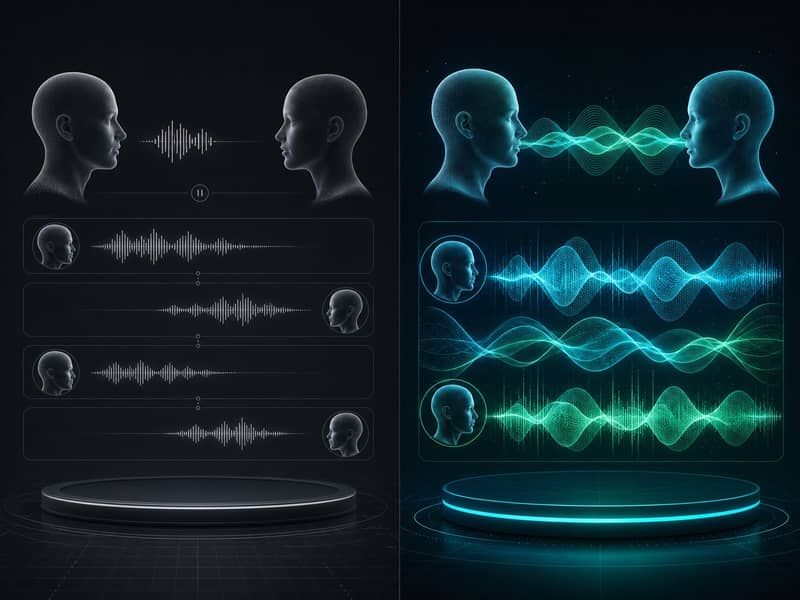
Advanced Voice Mode (old)
- ✗Half-duplex — waits for you to stop talking before it responds
- ✗Background noise is often mistaken for the end of your turn
- ✗Complex questions force an awkward pause while it "thinks"
GPT-Live (new)
- ✓Full-duplex — listens and speaks at the same time
- ✓Natural interruptions — you can jump in mid-response
- ✓Background processing keeps the conversation going without dead air
How to Use GPT-Live
How to Use GPT-Live in ChatGPT
Open ChatGPT
Launch the ChatGPT app on iOS or Android, or open ChatGPT.com on desktop or mobile web.
Tap the Voice button
Select the Voice icon to start a GPT-Live session. Free accounts get GPT-Live-1 mini; paid plans get the full GPT-Live-1 model.
Just start talking
Speak naturally and interrupt anytime — GPT-Live is full-duplex, so you don't need to wait for it to finish before jumping back in.
GPT-Live currently supports voice only — video and screen-share input are not yet supported in this release.
For Developers
GPT-Live API — When Is It Coming?
The GPT-Live API is planned but has not been released yet. OpenAI has not shared a public timeline, but developers can register to be notified when GPT-Live API access opens. Until then, the closest available option for building real-time voice apps is GPT-Realtime-2.1, OpenAI's current developer-facing realtime voice model.
Building now? Use GPT-Realtime-2.1 as the current alternative to the GPT-Live API.
AI Creative Suite
Pair GPT-Live with AI Music & Image Tools
GPT-Live is great for talking through an idea out loud — pair it with dedicated generation tools to turn that conversation into music and visuals.
GPT-Live + Suno
Describe a mood in GPT-Live, then generate a matching soundtrack with Suno AI.
Try Suno AI →GPT-Live + X Imagine AI
Ask GPT-Live to describe a scene, then bring it to life with X Imagine AI. No daily limits. No credit resets. Whether you search for XImageneAI or an X Image Generator, this is the tool built for exactly this workflow.
Try X Imagine AI →XImagineAI Pricing for AI Image & Video Generation
X Imagine AI brings Grok Imagine image generation, Grok Video creation, and Spicy Mode together on a single platform — with credits you can buy annually, subscribe to monthly, purchase for a project, or keep forever with a Lifetime Credit Pack. No X Premium subscription. No hitting a daily generation limit mid-project. 15,000+ creators, studios, and agencies have already made the switch.
Annual Starter
Total $120 · All credits available immediately
- 4,000 AI generation credits
- Grok Imagine image generation — full access
- Grok Video generation — cinematic AI video
- Spicy Mode unlocked
- Flux-based engine — advanced processing
- Professional-grade output quality
- Priority generation queue — no wait
- 12-month credit validity
- $120 billed once for the year
- No X Premium subscription needed
Annual Creator
Total $240 · All credits available immediately
- 9,600 AI generation credits
- Grok Imagine image generation — full access
- Grok Video generation — cinematic AI video
- Image-to-video conversion
- Spicy Mode — unlimited access
- Flux-based engine — advanced processing
- Professional-grade output quality
- Priority generation queue — no wait
- 12-month credit validity
- $240 billed once for the year
- No X Premium subscription needed
Annual Studio
Total $468 · All credits available immediately
- 19,200 AI generation credits
- Grok Imagine image generation — unrestricted
- Grok Video generation — cinematic AI video
- Image-to-video conversion
- Spicy Mode — unlimited access
- Flux-based engine — advanced features
- Ultra-high resolution output
- Priority generation — no queue
- Batch image processing
- 12-month credit validity
- $468 billed once for the year
- Priority technical support
Annual Scale
Total $708 · All credits available immediately
- 33,600 AI generation credits
- Grok Imagine image generation — unrestricted
- Grok Video generation — cinematic AI video
- Image-to-video conversion
- Spicy Mode — unlimited access
- Flux-based engine — advanced features
- Ultra-high resolution output
- Priority generation — no queue
- Batch image processing
- 12-month credit validity
- $708 billed once for the year
- Priority technical support
Annual Starter
Total $120 · All credits available immediately
- 4,000 AI generation credits
- Grok Imagine image generation — full access
- Grok Video generation — cinematic AI video
- Spicy Mode unlocked
- Flux-based engine — advanced processing
- Professional-grade output quality
- Priority generation queue — no wait
- 12-month credit validity
- $120 billed once for the year
- No X Premium subscription needed
Annual Creator
Total $240 · All credits available immediately
- 9,600 AI generation credits
- Grok Imagine image generation — full access
- Grok Video generation — cinematic AI video
- Image-to-video conversion
- Spicy Mode — unlimited access
- Flux-based engine — advanced processing
- Professional-grade output quality
- Priority generation queue — no wait
- 12-month credit validity
- $240 billed once for the year
- No X Premium subscription needed
Annual Studio
Total $468 · All credits available immediately
- 19,200 AI generation credits
- Grok Imagine image generation — unrestricted
- Grok Video generation — cinematic AI video
- Image-to-video conversion
- Spicy Mode — unlimited access
- Flux-based engine — advanced features
- Ultra-high resolution output
- Priority generation — no queue
- Batch image processing
- 12-month credit validity
- $468 billed once for the year
- Priority technical support
Annual Scale
Total $708 · All credits available immediately
- 33,600 AI generation credits
- Grok Imagine image generation — unrestricted
- Grok Video generation — cinematic AI video
- Image-to-video conversion
- Spicy Mode — unlimited access
- Flux-based engine — advanced features
- Ultra-high resolution output
- Priority generation — no queue
- Batch image processing
- 12-month credit validity
- $708 billed once for the year
- Priority technical support
Frequently Asked Questions
Build Your AI Creative Stack
Talk it through with GPT-Live, score it with Suno, then visualize it with X Imagine AI — live now at ximagineai.com. Some search for it as Imagine X AI, but it's the same free-to-start image generator built for exactly this workflow.